AmroGen REST API: Programmatic B2B Lead Generation and Outreach at Any Scale
TL;DR
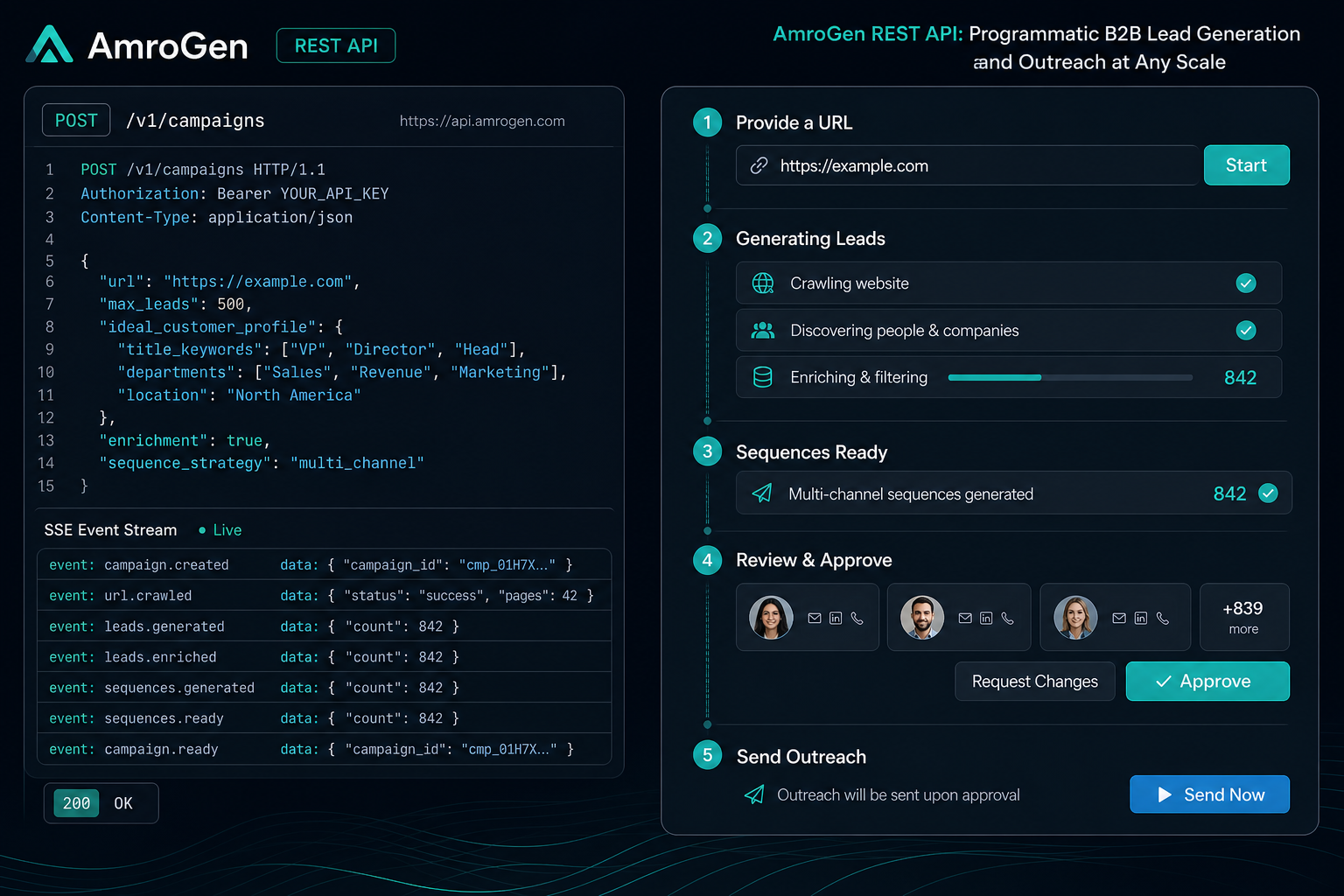
Most B2B outreach tools are built for a dashboard, not a codebase. AmroGen's REST API exposes the full pipeline — lead generation from a URL, sequence retrieval, campaign approval, and send triggering — as programmatic endpoints, with Server-Sent Events for real-time pipeline status. This guide covers authentication, the core endpoints, working code examples in Python and TypeScript, rate limits, and error handling, for developers building their own tools, internal automation, or AI agent workflows on top of AmroGen.
Table of Contents
- Why a B2B Outreach API
- Authentication
- Core Endpoints
- Code Examples
- Real-Time Pipeline Events via SSE
- Rate Limits
- Error Handling
- API vs MCP Server: Which to Use
- FAQ
Why a B2B Outreach API
Most outreach platforms — Apollo, Outreach, Salesloft, HubSpot — have published APIs, but they're built around exposing CRM-style data: contacts, sequences, activity logs. They assume you already have a sequence built in their dashboard and you're querying or modifying it programmatically. Very few expose the actual generation pipeline — researching a target company, enriching the resulting contacts, writing the outreach copy, and reviewing it for quality — as something you can trigger from code rather than a UI.
AmroGen's API exposes the entire pipeline as endpoints: you POST a company URL, the same Lead Generator, Orchestrator, and specialist agents that run behind the dashboard execute, and you GET back researched leads and AI-written, quality-reviewed sequences. This matters for three groups of builders specifically: teams embedding outreach generation into an internal tool (a CRM, an admin panel, an account research workflow), teams building on top of AmroGen as infrastructure for their own product, and developers wiring AmroGen into agentic workflows where an LLM decides when to trigger a campaign based on other signals.
Authentication
All requests use Bearer token authentication. Generate an API key from the dashboard under Settings → API Keys — keys are prefixed amro_sk_ and shown in full only once at creation.
`` Authorization: Bearer amro_sk_xxxxxxxxxxxxxxxxxxxx ``
``bash curl https://api.amrogen.com/campaigns \ -H "Authorization: Bearer amro_sk_xxxxxxxxxxxxxxxxxxxx" ``
Keys can be scoped, rotated, and revoked individually from the dashboard. Revoking a key takes effect immediately — any in-flight requests using a revoked key return 401 Unauthorized.
Core Endpoints
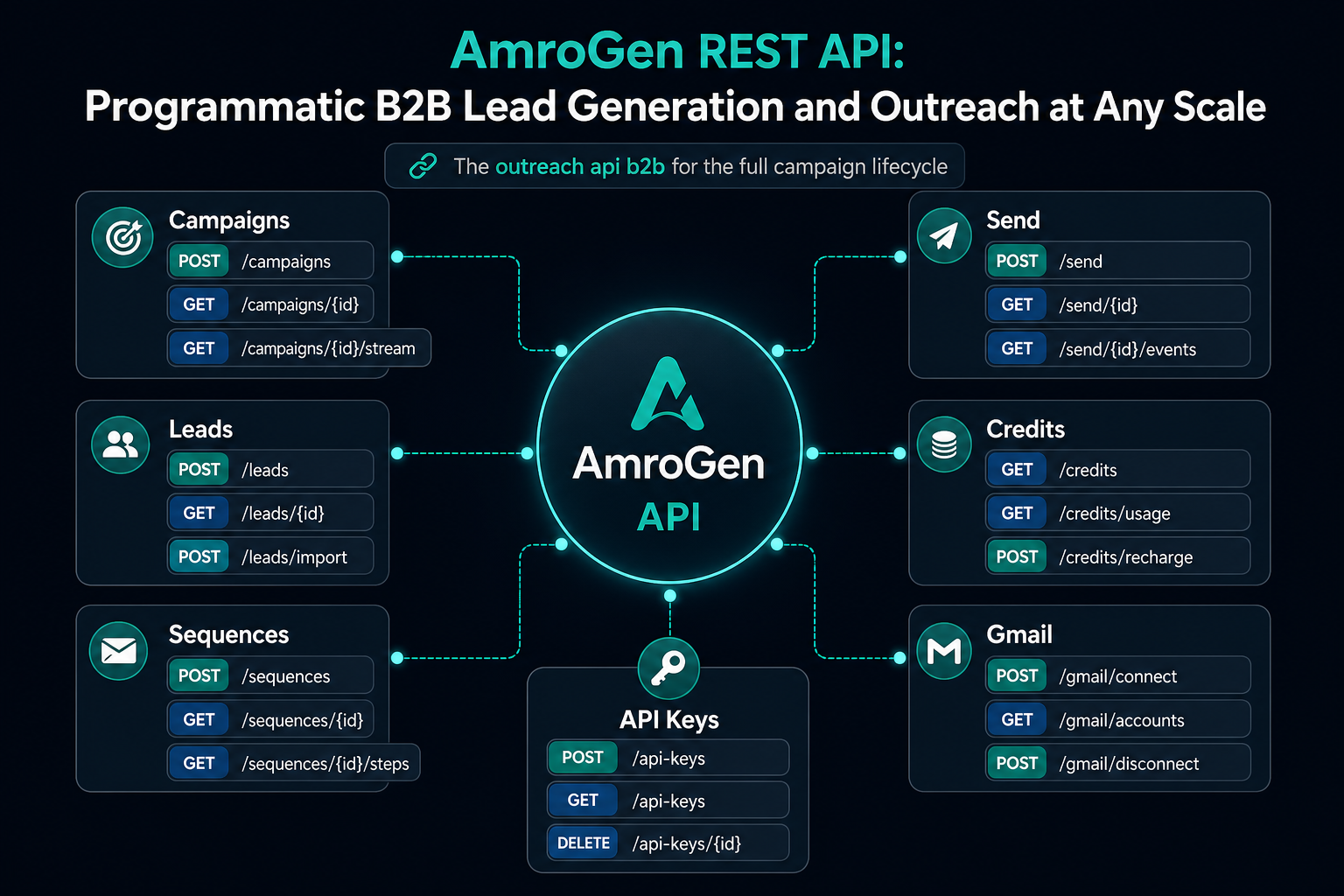
`` POST /campaigns Create a campaign — starts the full pipeline GET /campaigns List campaigns (paginated) GET /campaigns/{id} Get status, lead count, sequence count, files GET /campaigns/{id}/leads Retrieve enriched leads GET /campaigns/{id}/sequences Retrieve full sequences with step content PUT /campaigns/{id}/sequences/{seq_id} Update a single sequence's status POST /campaigns/{id}/approve-all Approve all sequences in one call POST /campaigns/{id}/send Start email dispatch GET /campaigns/{id}/stream SSE stream of real-time pipeline events GET /credits/balance Credit balance and transaction history POST /credits/purchase Create a Stripe checkout session for credits GET /gmail/status Check Gmail connection status GET /gmail/auth-url Get the Gmail OAuth URL GET /api-keys List API keys POST /api-keys Create an API key DELETE /api-keys/{id} Revoke an API key ``
Creating a campaign
``` POST /campaigns Content-Type: application/json
{ "target_url": "https://example-target-company.com", "leads_requested": 25, "batch_size": 5 } ```
Response:
``json { "id": "3fa85f64-5717-4562-b3fc-2c963f66afa6", "status": "queued", "target_url": "https://example-target-company.com", "leads_requested": 25, "credits_charged": 20, "created_at": "2026-06-29T14:02:11Z" } ``
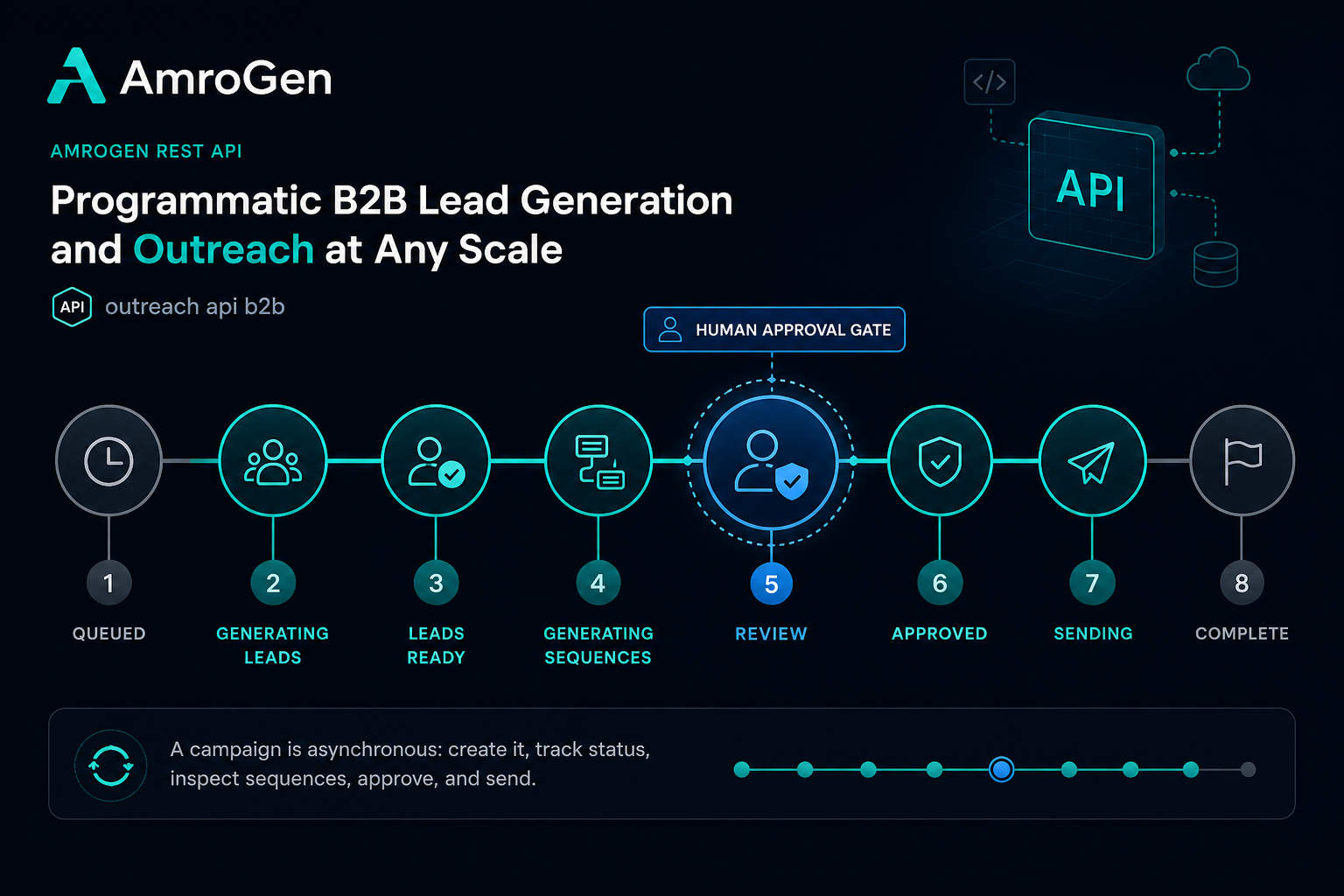
Credits are deducted at creation time — 8 credits per 10 leads requested. The pipeline runs asynchronously; poll GET /campaigns/{id} or subscribe to the SSE stream to track progress through queued → generating_leads → leads_ready → generating_sequences → review → approved → sending → complete.
Code Examples
Python
```python import requests import time
API_KEY = "amro_sk_xxxxxxxxxxxxxxxxxxxx" BASE_URL = "https://api.amrogen.com" headers = {"Authorization": f"Bearer {API_KEY}"}
Create a campaign
response = requests.post( f"{BASE_URL}/campaigns", headers=headers, json={ "target_url": "https://example-target-company.com", "leads_requested": 25, "batch_size": 5, }, ) campaign = response.json() campaign_id = campaign["id"]
Poll until sequences are ready for review
while True: status = requests.get(f"{BASE_URL}/campaigns/{campaign_id}", headers=headers).json() if status["status"] == "review": break if status["status"] == "failed": raise RuntimeError(status.get("error_message", "Pipeline failed")) time.sleep(15)
Retrieve and inspect sequences before approving
sequences = requests.get(f"{BASE_URL}/campaigns/{campaign_id}/sequences", headers=headers).json() print(f"{len(sequences)} sequences ready for review")
Approve and send
requests.post(f"{BASE_URL}/campaigns/{campaign_id}/approve-all", headers=headers) requests.post(f"{BASE_URL}/campaigns/{campaign_id}/send", headers=headers) ```
TypeScript
```typescript const API_KEY = "amro_sk_xxxxxxxxxxxxxxxxxxxx"; const BASE_URL = "https://api.amrogen.com";
async function createCampaign(targetUrl: string, leadsRequested = 25) { const response = await fetch(${BASE_URL}/campaigns, { method: "POST", headers: { Authorization: Bearer ${API_KEY}, "Content-Type": "application/json", }, body: JSON.stringify({ target_url: targetUrl, leads_requested: leadsRequested, batch_size: 5 }), }); return response.json(); }
async function pollUntilReview(campaignId: string): Promise<void> { while (true) { const res = await fetch(${BASE_URL}/campaigns/${campaignId}, { headers: { Authorization: Bearer ${API_KEY} }, }); const data = await res.json(); if (data.status === "review") return; if (data.status === "failed") throw new Error(data.error_message ?? "Pipeline failed"); await new Promise((r) => setTimeout(r, 15000)); } }
const campaign = await createCampaign("https://example-target-company.com"); await pollUntilReview(campaign.id);
const sequences = await fetch(${BASE_URL}/campaigns/${campaign.id}/sequences, { headers: { Authorization: Bearer ${API_KEY} }, }).then((r) => r.json());
console.log(${sequences.length} sequences ready for review); ```
Real-Time Pipeline Events via SSE
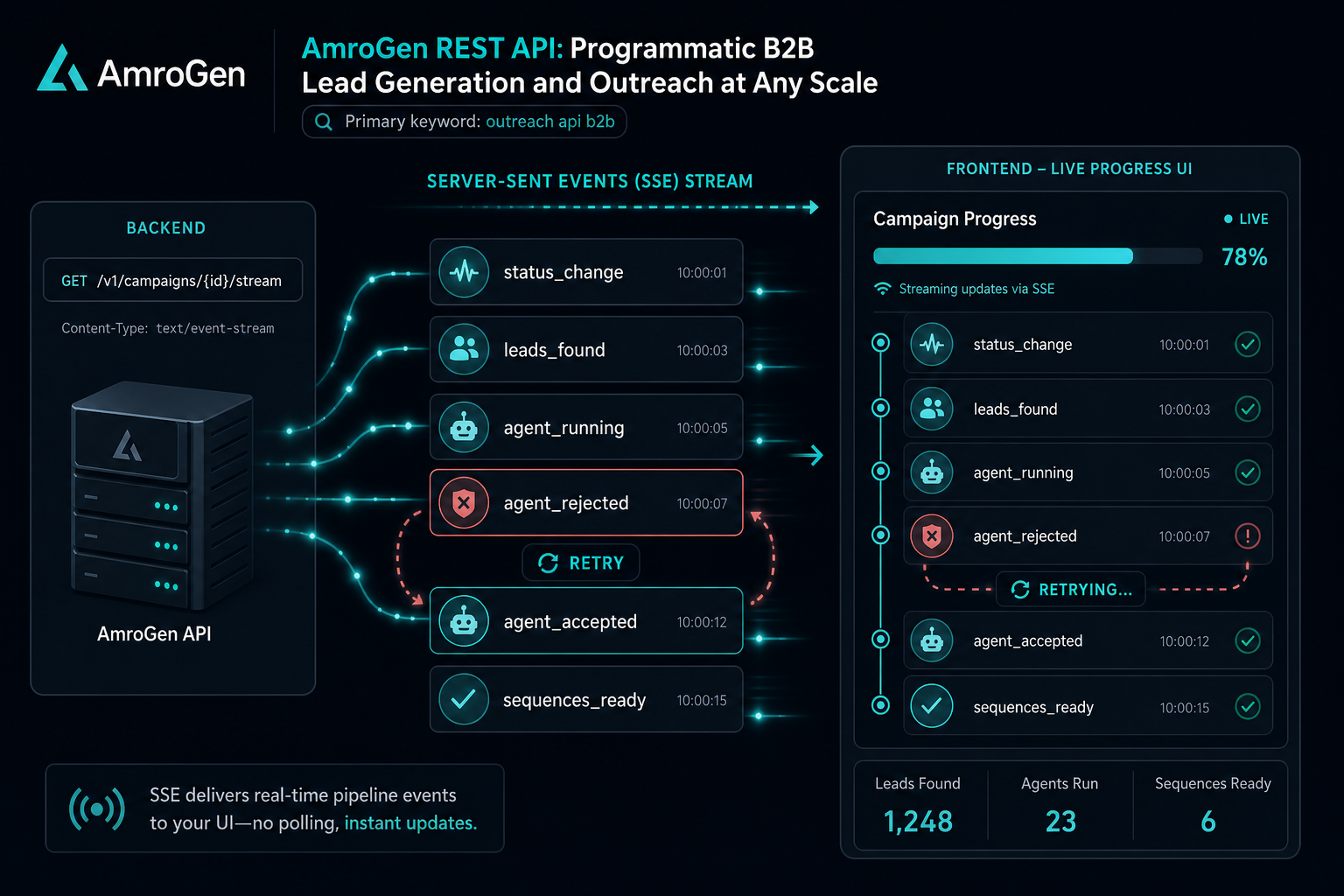
Rather than polling, subscribe to GET /campaigns/{id}/stream for a Server-Sent Events feed of structured pipeline updates as they happen — useful for building a live progress UI rather than refreshing on an interval.
`` GET /campaigns/3fa85f64-5717-4562-b3fc-2c963f66afa6/stream Accept: text/event-stream ``
Example event sequence:
``json { "type": "status_change", "status": "generating_leads" } { "type": "leads_found", "count": 25 } { "type": "orchestrator_planning", "message": "Routing leads to specialist agents..." } { "type": "agent_running", "agent": "email_agent", "attempt": 1 } { "type": "agent_accepted", "score": 9, "feedback": "Strong personalisation, passes review" } { "type": "agent_running", "agent": "outreach_agent", "attempt": 1 } { "type": "agent_rejected", "score": 5, "feedback": "Opening line too generic, retrying" } { "type": "agent_accepted", "score": 8, "feedback": "Revision addressed the issue" } { "type": "sequences_ready", "count": 25 } { "type": "status_change", "status": "review" } ``
The agent_rejected / agent_accepted pair is specific to AmroGen's quality review loop — most outreach APIs don't expose this level of pipeline internals, since most don't have an equivalent review step to expose.
Rate Limits
API requests are rate-limited per API key. Standard limits: 100 requests/minute for read endpoints (GET), 20 requests/minute for write endpoints (POST, PUT, DELETE). Rate limit headers are returned on every response:
`` X-RateLimit-Limit: 100 X-RateLimit-Remaining: 87 X-RateLimit-Reset: 1719676800 ``
Exceeding the limit returns 429 Too Many Requests with a Retry-After header. For high-throughput integrations, batch campaign creation rather than firing many concurrent requests, and prefer the SSE stream over polling to reduce read-endpoint volume.
Error Handling
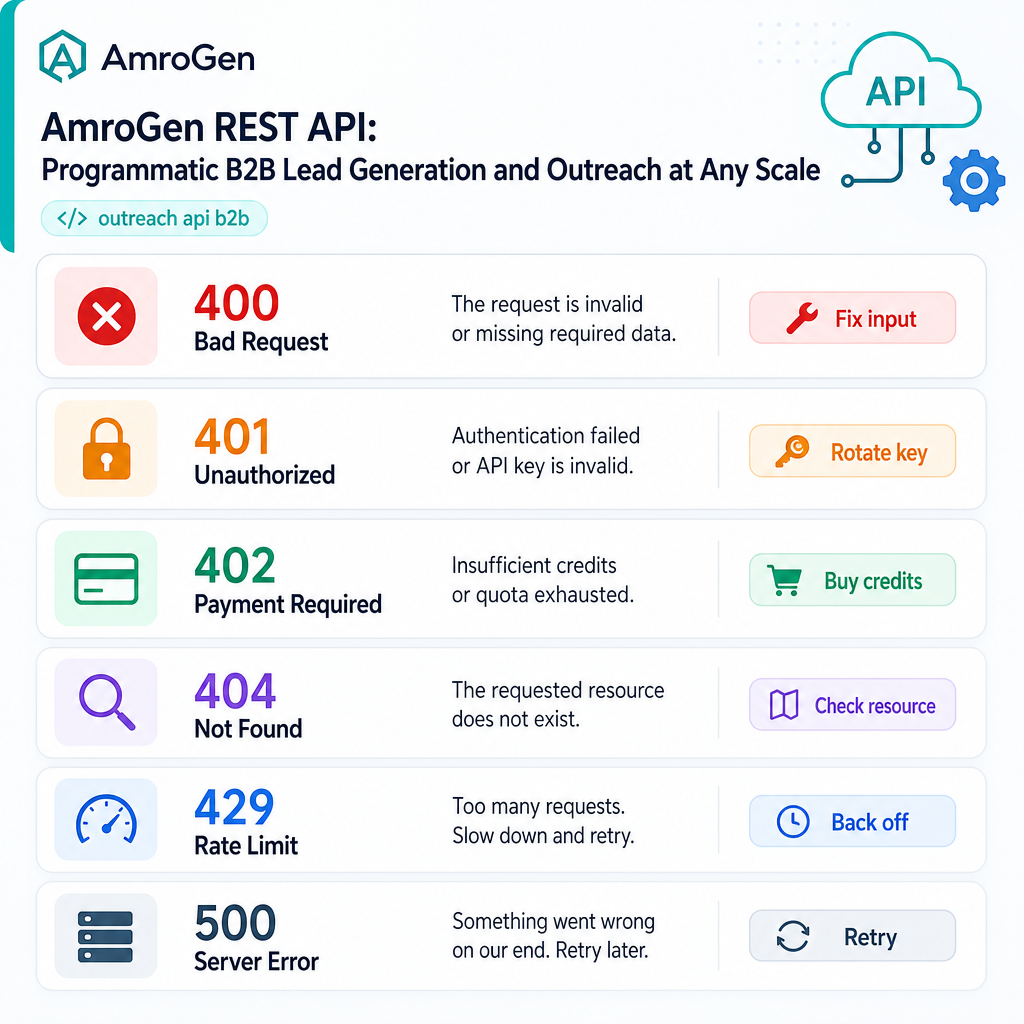
| Status | Meaning | Typical cause |
|---|---|---|
400 | Bad request | Missing required field, invalid target_url format |
401 | Unauthorized | Invalid or revoked API key |
402 | Payment required | Insufficient credits for the requested campaign |
404 | Not found | Campaign or sequence ID doesn't exist or belongs to a different account |
429 | Rate limited | Too many requests in the current window |
500 | Server error | Transient pipeline failure — safe to retry with backoff |
All error responses include a detail field with a human-readable explanation:
``json { "detail": "Insufficient credits. Current balance: 12, required: 20." } ``
Handle 402 responses by checking GET /credits/balance and either purchasing more credits via POST /credits/purchase or reducing leads_requested.
API vs MCP Server: Which to Use
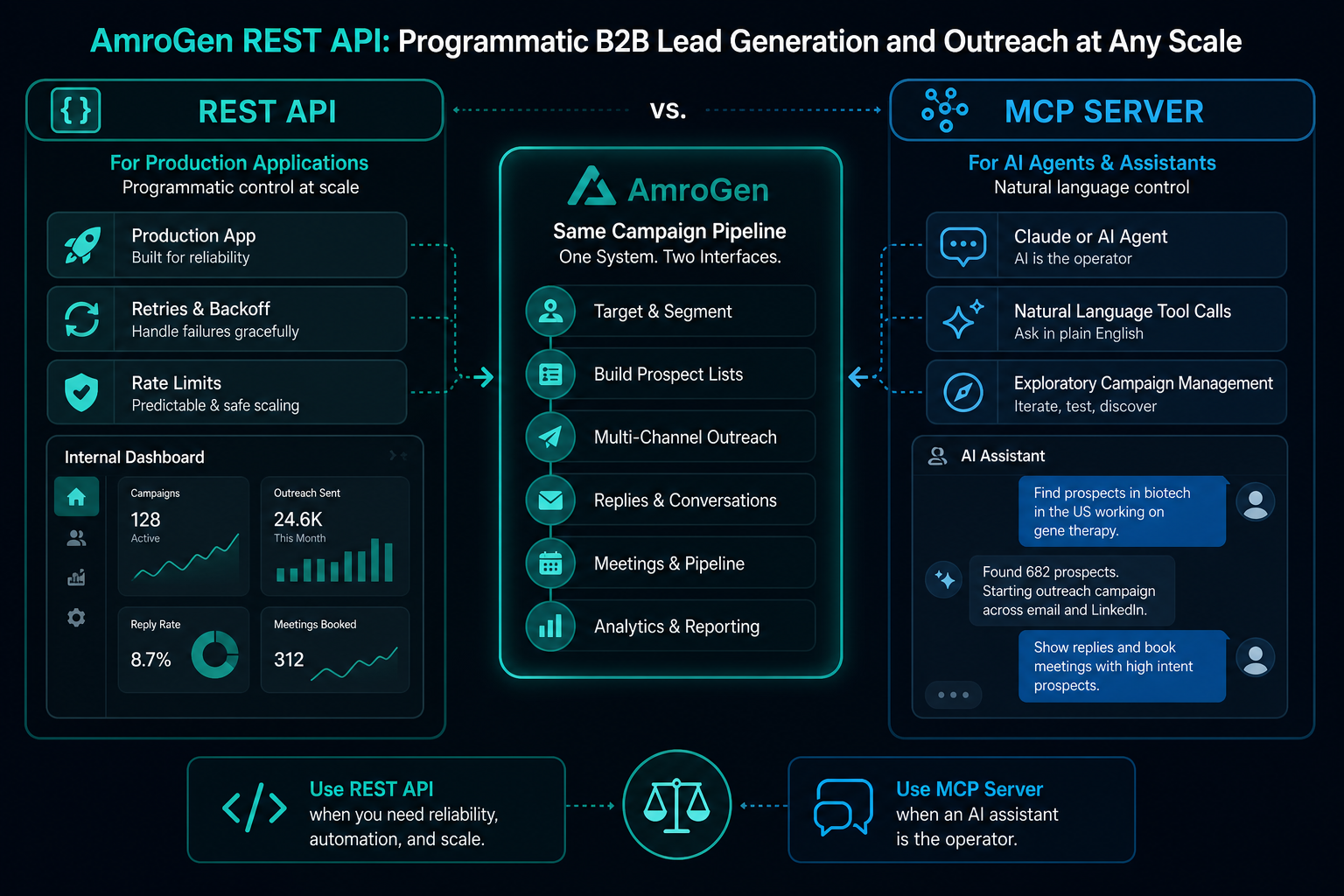
AmroGen also ships an MCP server exposing the same core capabilities as callable tools for Claude Desktop, Cursor, and other MCP-compatible AI clients. The choice between them depends on what you're building.
Use the REST API when you're building a production application, an internal tool with its own UI, or a pipeline where you need fine-grained control over retries, rate limiting, and error handling in your own code.
Use the MCP server when the consumer is an AI agent or assistant rather than application code — for example, asking Claude Desktop directly to "find leads for acme.com and draft outreach," with the agent deciding which tools to call and in what order, without you writing the orchestration logic yourself.
The two aren't mutually exclusive. A common pattern: use MCP for exploratory work and human-in-the-loop campaign creation through Claude, then move to direct API calls once a workflow is proven and needs to run unattended at volume — the same pattern teams increasingly report using across other sales tool MCP integrations, where MCP is good for designing a workflow and direct API calls are better for running it in production at scale.
FAQ
How do I automate B2B outreach via API? Send a POST /campaigns request with a target company URL and the number of leads you want. AmroGen's pipeline runs the full sequence — lead research, enrichment, sequence writing, and quality review — and you retrieve results via GET /campaigns/{id}/sequences once status reaches review. Approve and trigger sending via dedicated endpoints, all without touching the dashboard.
Does Apollo have an API? Yes — Apollo's API covers search, enrichment, and sequence management. It assumes you provide the search criteria and copy; it doesn't generate outreach from research the way AmroGen's pipeline does. Apollo also launched an official MCP server in February 2026 covering similar ground for Claude-based workflows.
What is the best outreach API for B2B? Depends on what you're automating. For querying an existing CRM-style contact database programmatically: Apollo, ZoomInfo, or HubSpot's APIs. For triggering the full research-to-reviewed-sequence pipeline from a single URL input, including AI-generated copy with a built-in quality check: AmroGen's API is purpose-built for that specific workflow.
How do I integrate B2B lead generation into my app? Call POST /campaigns with your target company URL from your application backend, poll or subscribe via SSE for completion, then pull structured lead and sequence data via the corresponding GET endpoints to display or act on within your own UI.
API reference current as of June 2026. Endpoint signatures may evolve — check the live documentation for the latest schema.
Internal links: /developers · /mcp-server · /pricing · /sign-up