AmroGen MCP Server: Trigger Lead Generation and Outreach From Claude Desktop or Any AI Agent
TL;DR
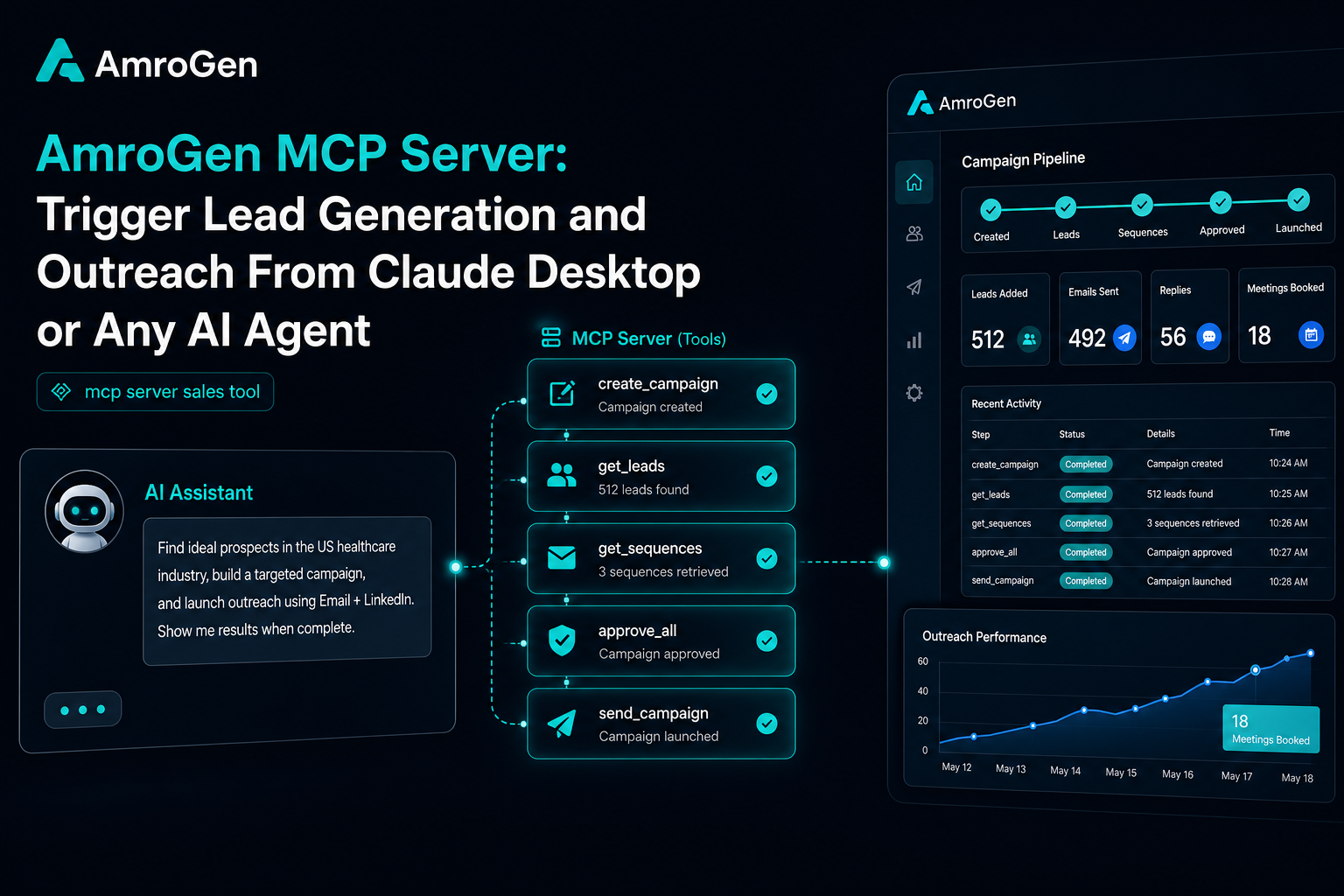
MCP for sales tools moved fast in 2026 — Apollo, Amplemarket, Outreach, ZoomInfo, Clay, and Salesforge have all shipped official servers, and the category has split into two clear types: read-only servers that let an AI assistant query existing CRM data, and read-write servers that let it actually take action — enroll contacts, build sequences, trigger sends. AmroGen's MCP server is read-write and covers the full pipeline: it's the only one of these that includes lead generation from a company URL rather than database search, and the only one with a built-in quality review step exposed as part of the workflow. This guide covers setup, the full tool list, and example usage from Claude Desktop.
Table of Contents
- What MCP Actually Changes for Sales Tools
- The Current MCP-for-Sales Landscape
- Where AmroGen's MCP Server Fits
- Setup: Connecting AmroGen to Claude Desktop
- The Full Tool List
- Example Workflow
- FAQ
What MCP Actually Changes for Sales Tools
Model Context Protocol is an open standard, developed by Anthropic, that lets AI assistants like Claude discover and call external tools directly — without custom integration code for every connection. For sales workflows specifically, this means an agent in Claude Desktop or Cursor can search for a prospect, enrich their contact details, draft outreach, and take action — enrolling them in a sequence or sending a message — inside a single conversation, instead of you tabbing between five different dashboards.
The ecosystem has grown fast. As of 2026, over 8,600 MCP servers exist across the public directory, with 28% of Fortune 500 companies reporting some form of MCP implementation. For sales specifically, the meaningful distinction across the category is read versus write: read-only servers (HubSpot, Salesforce, Salesloft, ZoomInfo, Clay out of the box) let Claude pull data and context but can't take action on it. Read-write servers (Amplemarket, Apollo, Outreach, AmroGen, Instantly) can create records, build sequences, or enroll prospects into live outreach directly from the conversation.
The Current MCP-for-Sales Landscape
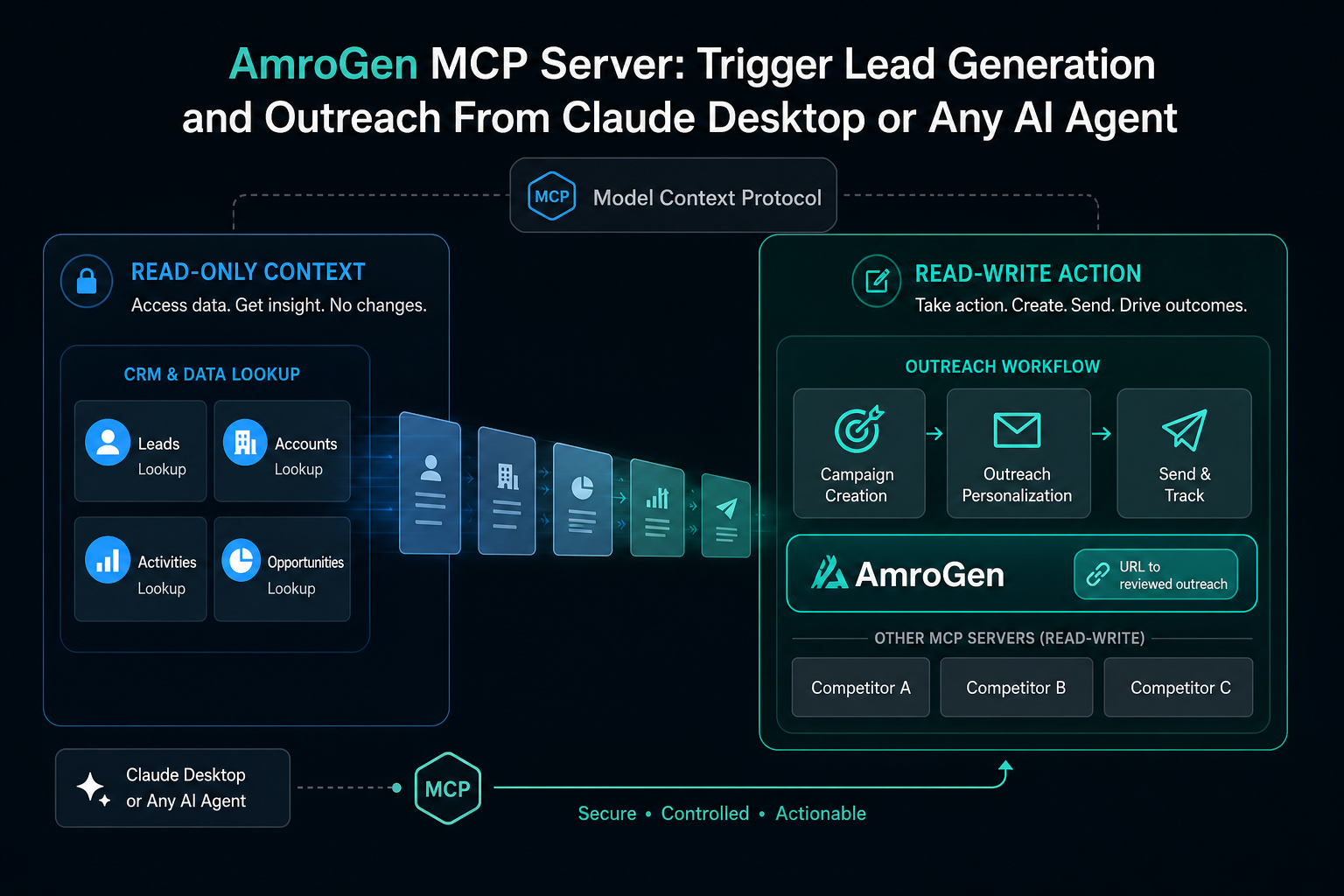
This space is no longer empty. By mid-2026, most major sales platforms have shipped some form of MCP server, and independent evaluations have started scoring them against a common rubric — typically finding leads, enriching/researching them, building multichannel sequences, enrolling into live outreach, and AI client compatibility.
The pattern that emerges across these comparisons is consistent: most servers cover one or two stages of the pipeline well and leave gaps elsewhere. Outreach's MCP, launched February 2026, is explicitly read-only — it surfaces pipeline, deal, and call-transcript data for AI-assisted analysis, but can't build or enroll sequences. ZoomInfo's server covers account and contact search and enrichment with no sequence execution layer — you still need a separate sending tool. Clay's MCP triggers pre-built enrichment workflows but has nothing to offer if you haven't already configured those workflows inside Clay itself; one founder building a programmatic outbound system described moving real production workflows to direct API calls because Clay's MCP is "basically impossible" to use for fully code-driven outbound at scale. Apollo's MCP, also launched February 2026, covers search, enrichment, contact creation, and sequence enrollment on all paid plans at no extra cost — broader than most, but limited to email sequences with no LinkedIn or multichannel coverage, and some practitioners report mixed search quality requiring a separate data provider underneath it. Amplemarket's server is widely regarded as the most complete single-platform option, covering prospecting through sent, personalised sequences in one connection across both Claude and ChatGPT.
Where AmroGen's MCP Server Fits
Two things distinguish AmroGen's server from the field above, both tied directly to how the underlying platform works.
It generates leads, not just searches for them. Every other server in this category — Apollo, ZoomInfo, Clay, Amplemarket — searches or enriches against a stored or partner database. AmroGen's amrogen_create_campaign tool takes a company URL and runs the actual Lead Generator agent, which browses the target company's live web presence to find and verify decision-makers in real time. There's no equivalent "give me a URL and find the people" tool in any of the servers reviewed above; they all assume a database lookup is the starting point.
The quality review loop is exposed as part of the workflow, not hidden inside it. AmroGen's tools surface the same Orchestrator scoring and retry logic that runs in the dashboard — an agent calling amrogen_get_sequences sees sequences that have already been scored for personalisation depth and accuracy, and amrogen_update_sequence lets a human or agent approve, pause, or stop individual sequences with that context visible. None of the read-write servers surveyed above expose an equivalent quality gate as part of their tool surface.
The trade-off is honest: AmroGen's server doesn't have Apollo's or ZoomInfo's database breadth, and it doesn't match Amplemarket's full native multichannel breadth across phone and social. It's purpose-built for one specific, complete workflow — URL to researched leads to reviewed, sendable sequences — rather than being a general-purpose CRM or database connector.
Setup: Connecting AmroGen to Claude Desktop
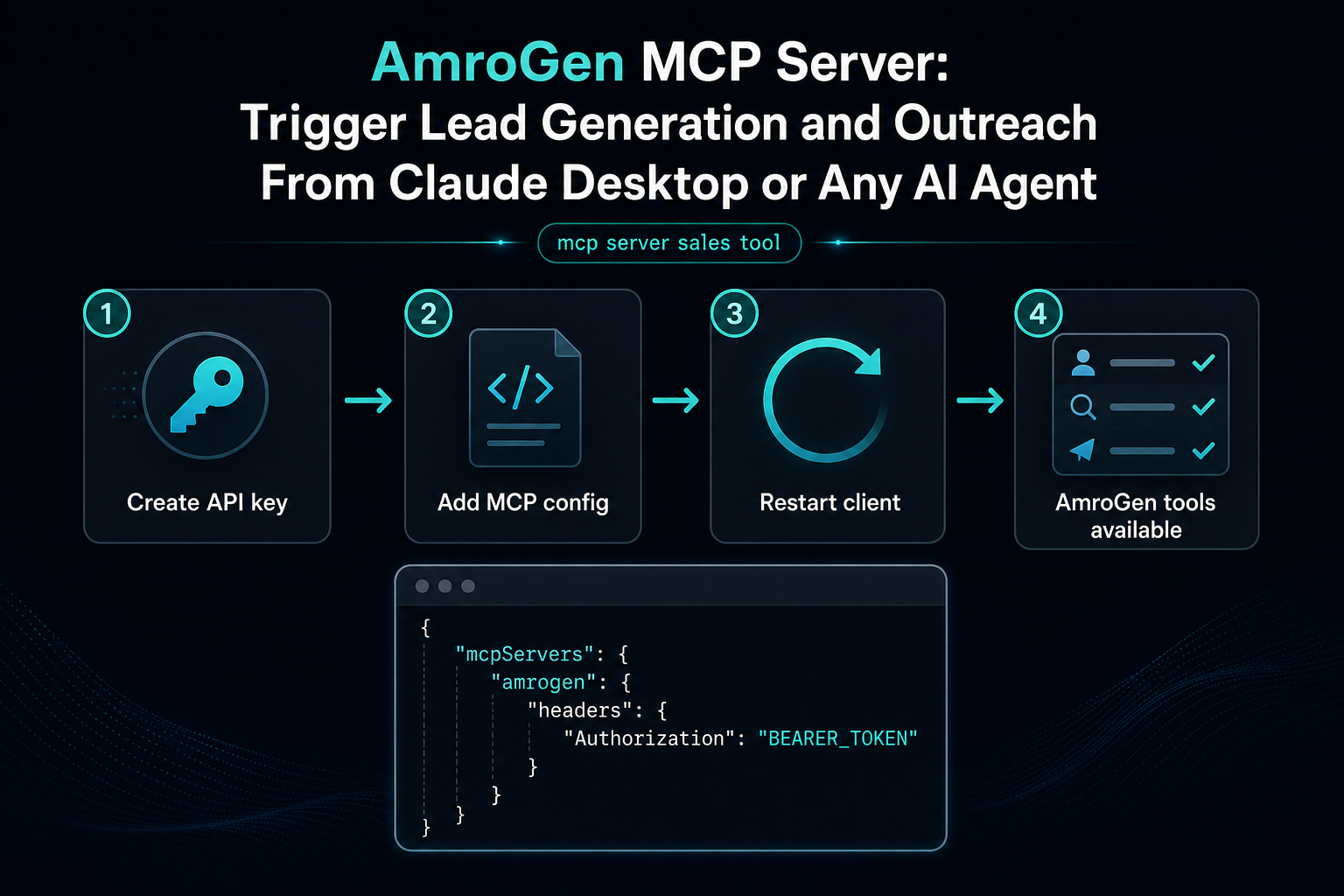
Generate an API key from the AmroGen dashboard (Settings → API Keys), then add the server to your Claude Desktop configuration file:
``json { "mcpServers": { "amrogen": { "command": "npx", "args": ["-y", "mcp-remote", "https://api.amrogen.com/sse"], "env": { "BEARER_TOKEN": "amro_sk_your_key_here" } } } } ``
Restart Claude Desktop. The 15 AmroGen tools become available automatically — no further configuration needed. The same connection pattern works with Cursor and any other MCP-compatible client; only the config file location changes.
The Full Tool List
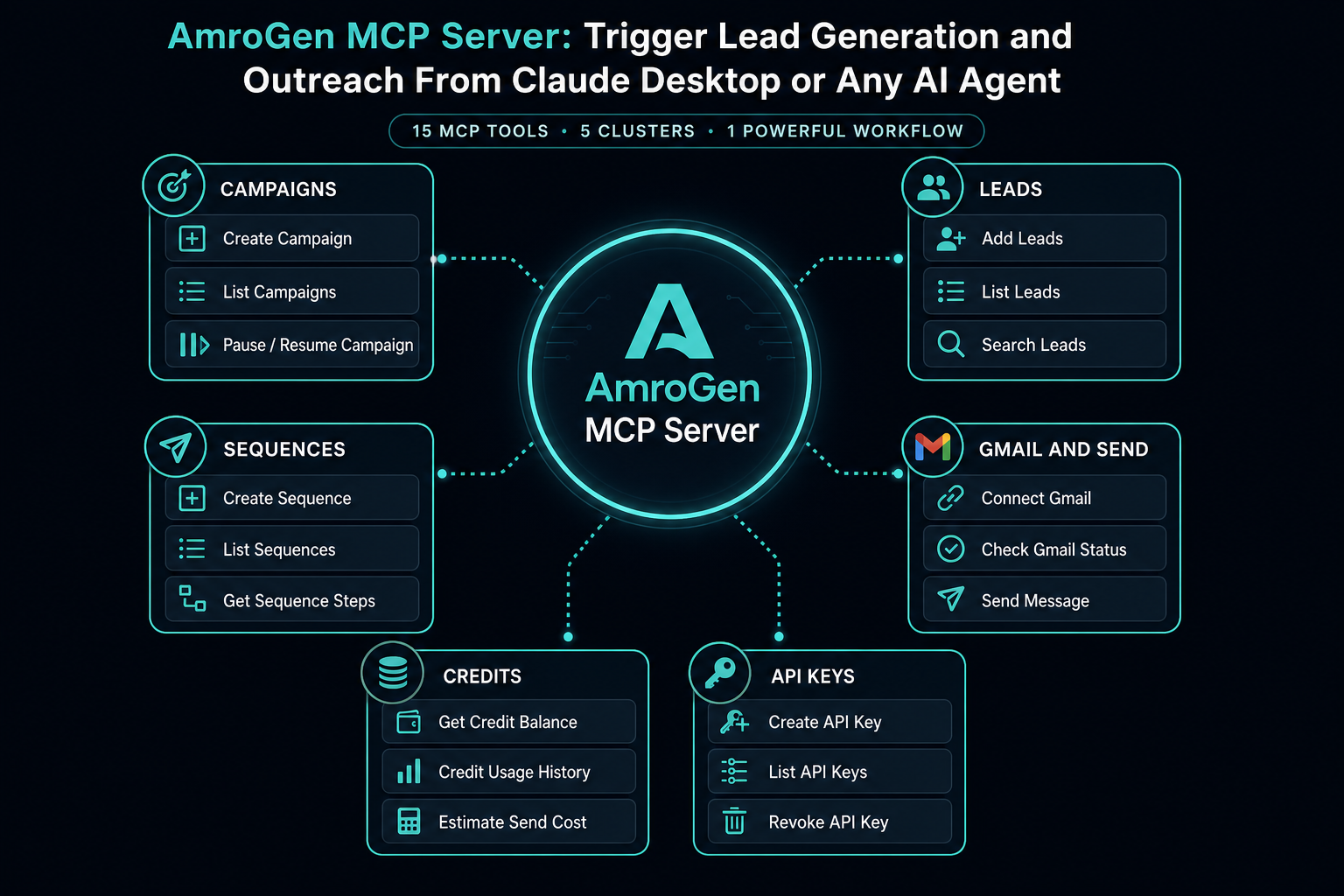
| Tool | What it does |
|---|---|
amrogen_create_campaign | Launch a pipeline from a target company URL |
amrogen_list_campaigns | List all campaigns, paginated |
amrogen_get_campaign | Get status, lead count, sequence count, files |
amrogen_get_leads | Retrieve enriched leads for a campaign |
amrogen_get_sequences | Retrieve full sequences with step-level content |
amrogen_approve_all_sequences | Approve every pending sequence in one call |
amrogen_update_sequence | Approve, pause, or stop a single sequence |
amrogen_send_campaign | Trigger email dispatch for approved sequences |
amrogen_get_balance | Check credit balance and transaction history |
amrogen_purchase_credits | Create a Stripe checkout session for more credits |
amrogen_gmail_status | Check whether Gmail is connected |
amrogen_get_gmail_auth_url | Get the OAuth URL to connect Gmail |
amrogen_list_api_keys | List active API keys |
amrogen_create_api_key | Create a new API key |
amrogen_revoke_api_key | Revoke an API key immediately |
Example Workflow
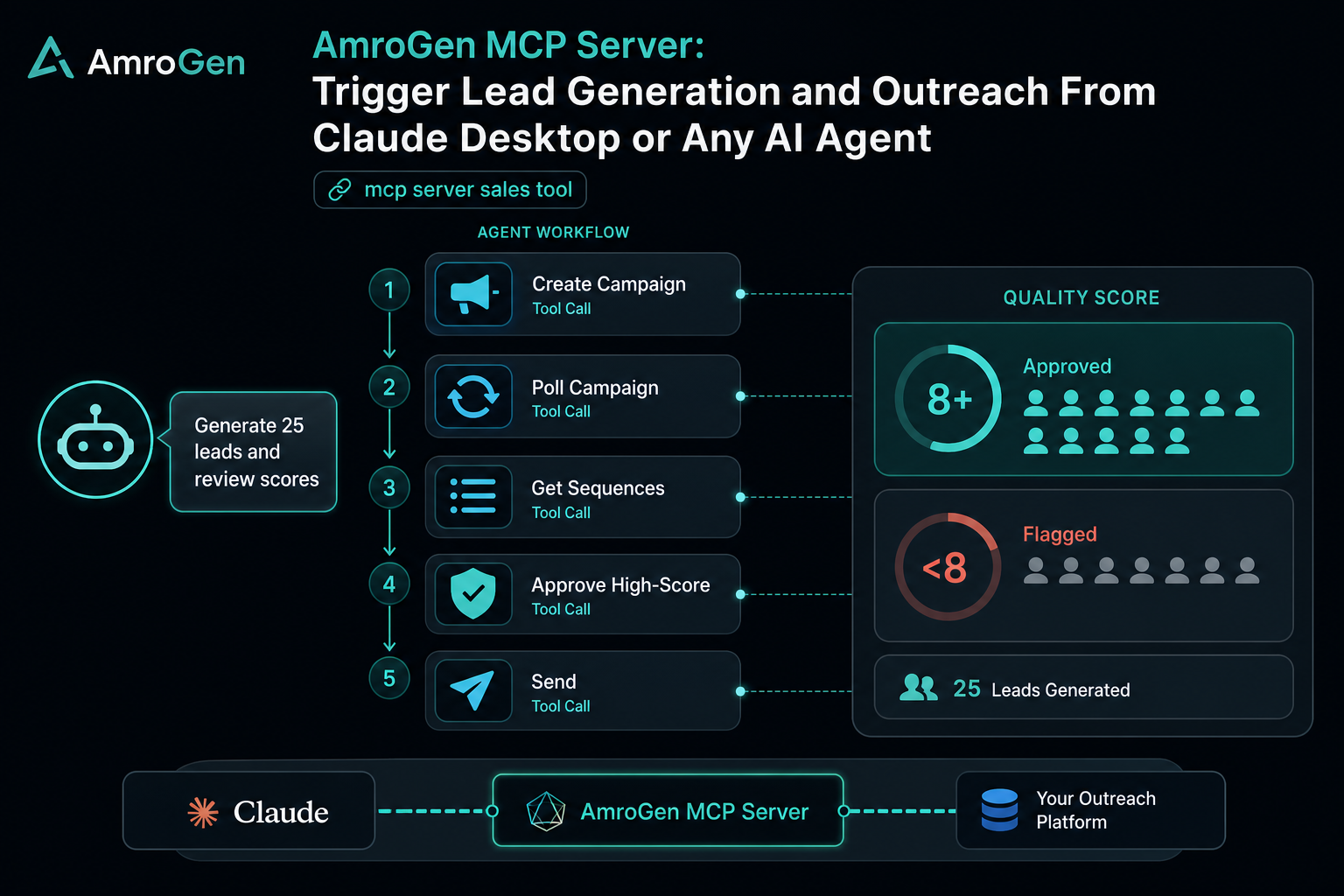
Once connected, a natural-language prompt in Claude Desktop is enough to run an entire campaign:
"Generate 25 leads for acme-target-company.com, review the sequences once they're ready, and tell me if any of them scored below 8 on the quality review."
Claude calls amrogen_create_campaign, polls amrogen_get_campaign until status reaches review, retrieves the sequences with amrogen_get_sequences, and reports back — all without you opening the AmroGen dashboard once. From there, a follow-up prompt like "approve everything that scored 8 or higher and send it" chains amrogen_update_sequence and amrogen_send_campaign calls automatically.
This pattern — exploratory, conversational campaign management through Claude — is the strongest current use case for MCP-based sales tooling generally. For high-volume, unattended production workflows (hundreds of campaigns running on a schedule), most teams eventually move to direct API calls for the tighter control over retries and rate limiting that code provides; MCP and the REST API are complementary, not competing, layers.
FAQ
What is an MCP server? An MCP (Model Context Protocol) server is a standardised interface that lets AI assistants like Claude call external tools and access external data directly, without custom integration code for each connection. For sales tools specifically, MCP servers expose actions like searching for contacts, enriching data, building sequences, or sending outreach as things an AI agent can do on your behalf inside a single conversation.
Can Claude generate leads? Not on its own — Claude has no inherent access to company data. Connected to a database-search MCP server (Apollo, ZoomInfo), Claude can search and filter existing records. Connected to AmroGen's MCP server, Claude can trigger actual lead generation — researching a target company's live web presence to find and verify decision-makers that may not exist in any stored database at all.
How do I connect Claude to a sales tool? Most platforms require generating an API key from the tool's dashboard, then adding a server entry to your Claude Desktop (or other MCP client) configuration file pointing to that platform's MCP endpoint with your credentials. Setup typically takes under 10 minutes per tool.
What MCP tools are available for sales? As of 2026, official MCP servers exist for Apollo, ZoomInfo, Amplemarket, Outreach, HubSpot, Salesforce, Salesloft, Clay, Instantly, Smartlead, and AmroGen, among others, covering everything from read-only CRM querying to full prospecting-through-sending workflows. Coverage and read/write capability vary significantly — check each server's documentation before building a workflow that depends on it.
Can I use AmroGen from Claude Desktop? Yes. AmroGen's MCP server exposes all 15 platform tools — lead generation, sequence retrieval, approval, sending, credits, and API key management — directly to Claude Desktop, Cursor, and any other MCP-compatible client via a standard configuration entry.
Reflects the publicly documented MCP-for-sales landscape as of June 2026. This is a fast-moving category — server capabilities and competitor offerings change frequently.
Internal links: /developers · /features/ai-sequences · /pricing