How to Generate B2B Leads Automatically in 2026 (From Any Company URL)
TL;DR
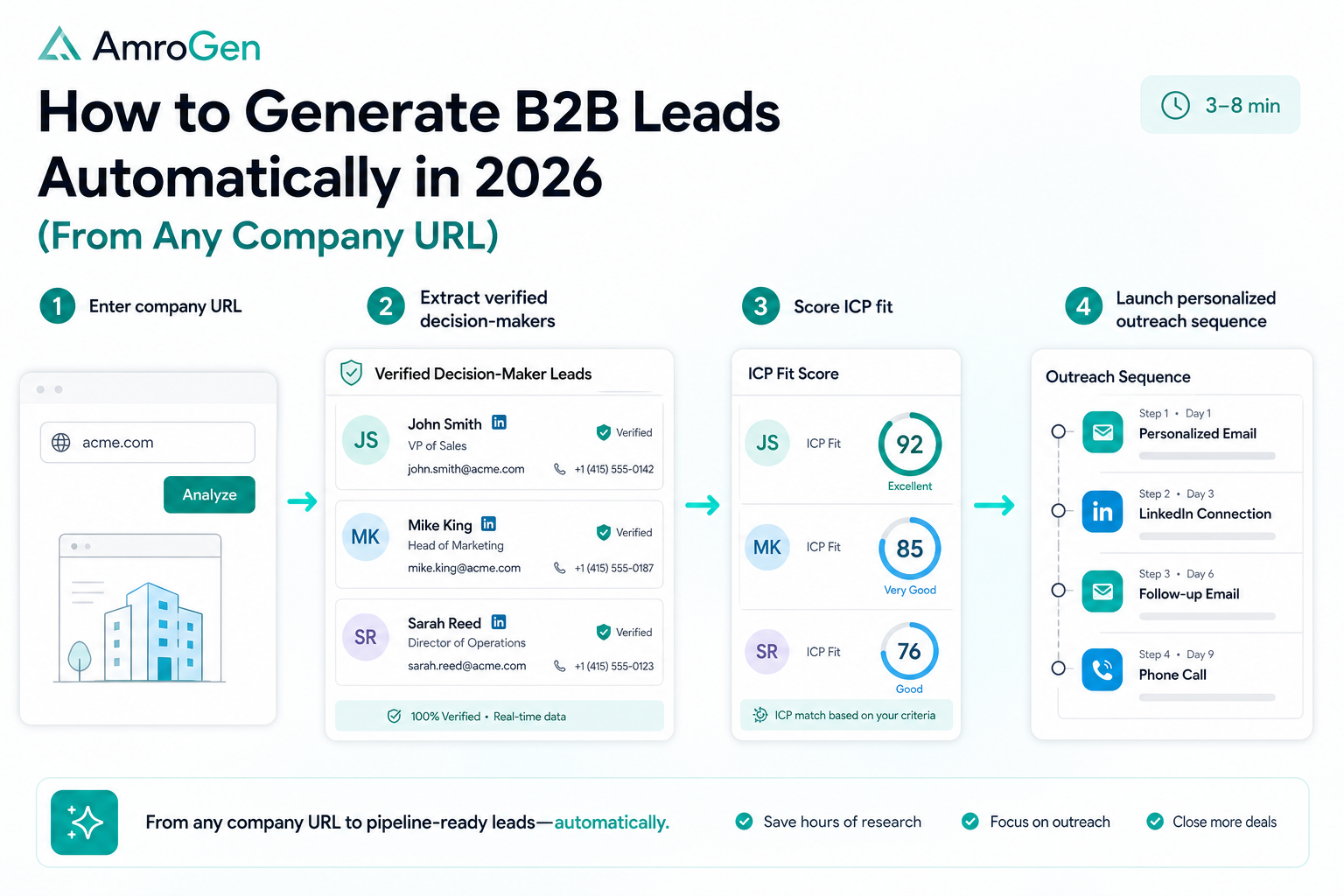
Most "how to generate B2B leads automatically" guides walk you through buying database access, configuring filters, and exporting a CSV — which is automation of the search, not automation of the actual research. This guide covers six real methods, from content-driven inbound to chatbot capture to database tools, and then walks through the one that requires neither a list nor a database subscription: entering a company URL and letting an AI agent research and enrich the right contacts directly. By the end, you'll have generated your first automated lead list from a company URL through lead and sequence review.
Table of Contents
- What "Automatic" Actually Means in Lead Generation
- Method 1: Database Search Tools
- Method 2: Chatbots and Inbound Capture
- Method 3: Content and SEO-Driven Inbound
- Method 4: Paid Acquisition
- Method 5: Intent-Signal Monitoring
- Method 6: URL-Based Live Research (AmroGen)
- Step-by-Step: Your First Automated Campaign
- FAQ
What "Automatic" Actually Means in Lead Generation
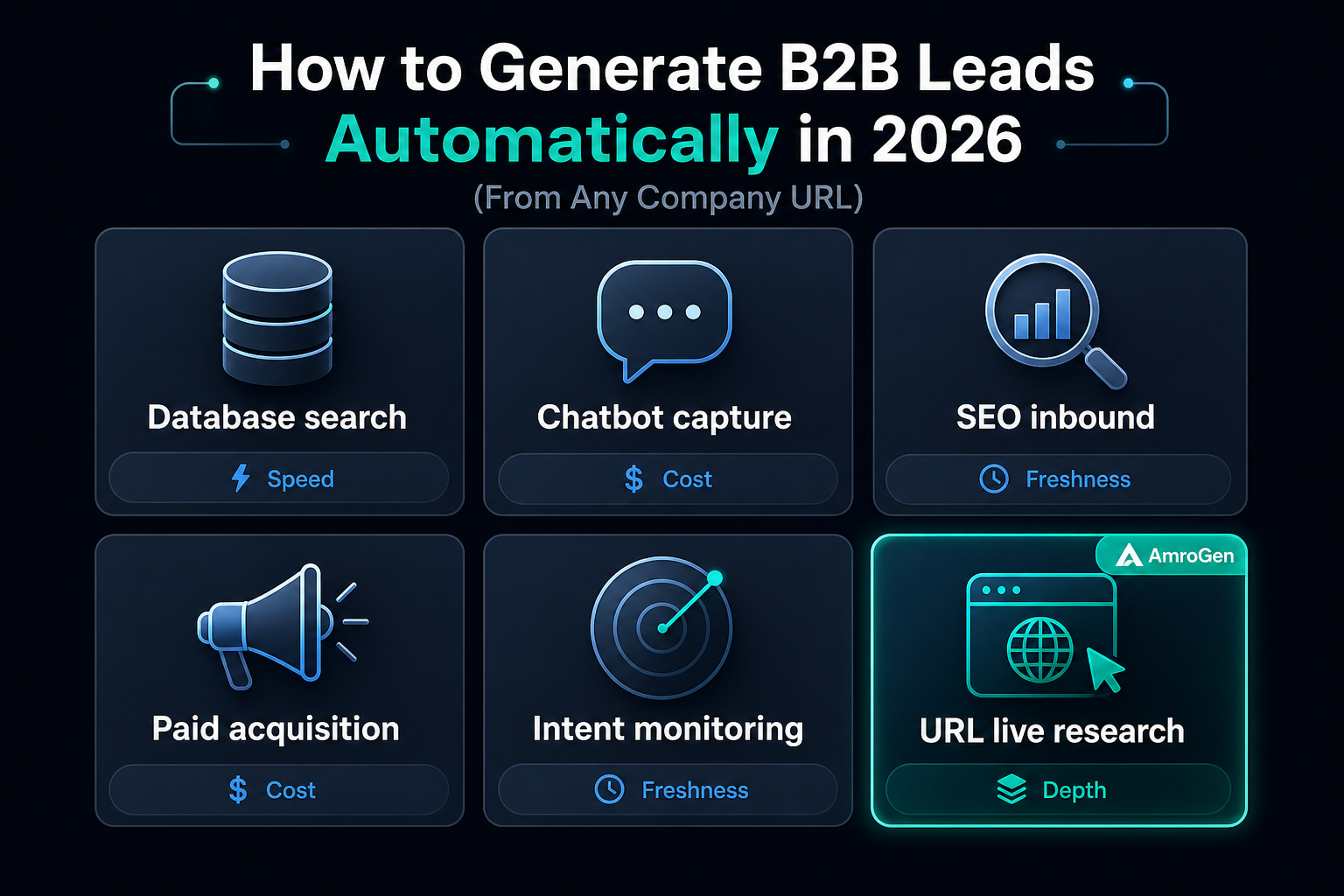
Most content under this exact search term defaults to one of two answers: "buy database access" or "build inbound content and wait." Both are legitimate, and both involve genuine automation somewhere in the funnel. But it's worth being precise about what's actually automated in each case, because the term gets stretched to cover very different amounts of manual work.
Searching a database with filters and exporting a list automates the search step — you still need to verify the data is current, write the outreach, and decide who's actually worth contacting. Inbound content automates capture — someone fills out a form because your content reached them — but it depends on traffic and conversion infrastructure that takes months to build. The method covered last in this guide automates the research and enrichment step itself: instead of searching a static database, an agent goes and finds the actual people at a specific target company, verifies their contact details in real time, and hands you something ready to act on.
Method 1: Database Search Tools
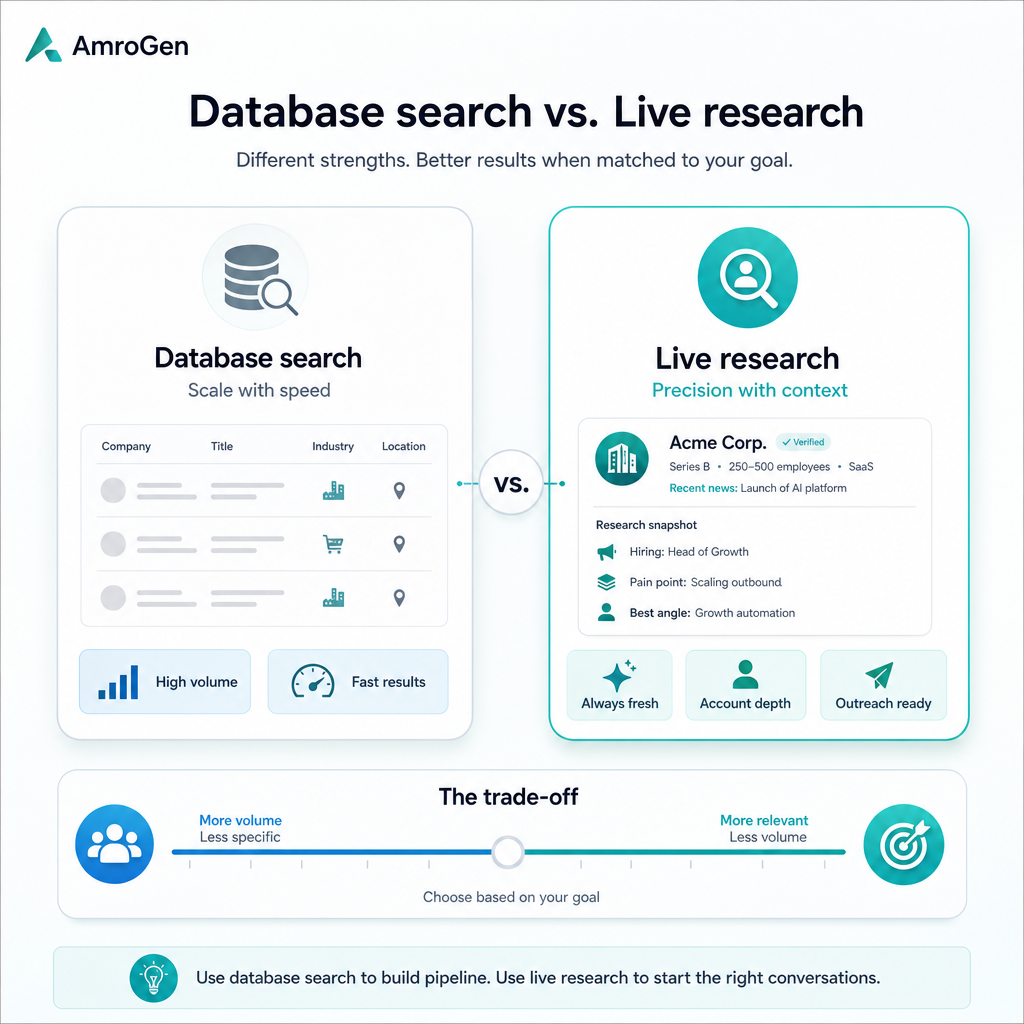
The most common starting point. Apollo, ZoomInfo, Cognism, and similar platforms hold large pre-verified contact inventories you filter by industry, company size, job title, and other criteria, then export. This is fast and produces volume — hundreds or thousands of contacts in minutes.
The trade-off: the data was verified at some point in the past, not at the moment you export it, and the gap between those two points is where bounce rates come from. Most single-source databases deliver 70–85% accuracy, meaning 15–30% of outreach built on an exported list never arrives. Coverage also thins significantly outside well-documented segments — smaller companies, international markets, and recent job changes are where these databases are weakest.
Good for: High-volume outbound across broad target segments where some bounce rate is acceptable.
Method 2: Chatbots and Inbound Capture
Website chatbots that qualify and capture visitor information automatically, routing qualified leads to sales without a human touching the initial conversation. This generates leads "automatically" in the sense that no rep is manually working the front of the funnel — but it only works on traffic you already have, and the volume ceiling is whatever your website attracts.
Good for: Teams with meaningful existing website traffic who want to capture and qualify it without manual triage.
Method 3: Content and SEO-Driven Inbound
Publishing content that ranks for terms your target buyers search, building organic traffic that converts into leads over time without ongoing ad spend. Genuinely automatic once built, in the sense that content keeps generating leads without daily effort — but the build time is measured in months, and it requires sustained content production to maintain.
Good for: Teams with a long time horizon and content production capacity, building a durable lead source that doesn't depend on a per-lead spend.
Method 4: Paid Acquisition
LinkedIn and Google ads targeting your ICP, automatically capturing leads through landing pages and forms. Fast to start, fully automated once campaigns are live, but the leads cost money on an ongoing basis and stop the moment you stop paying — unlike content, there's no compounding asset being built.
Good for: Teams that want immediate volume and have budget to sustain ongoing spend.
Method 5: Intent-Signal Monitoring
Tools that monitor for buying signals — job postings, funding announcements, technology adoption, website visits — and surface accounts showing those signals automatically, often layered on top of a database tool. This shifts lead generation from "who matches my filters" to "who is actually showing buying behaviour right now," which tends to produce better-timed outreach. Teams that route buying signals into automated sequences report reply rates in the 15–25% range, compared to a 3–5% industry average for generic cold outbound.
Good for: Teams with an existing database tool who want to prioritise within it rather than contact everyone who matches a static filter.
Method 6: URL-Based Live Research
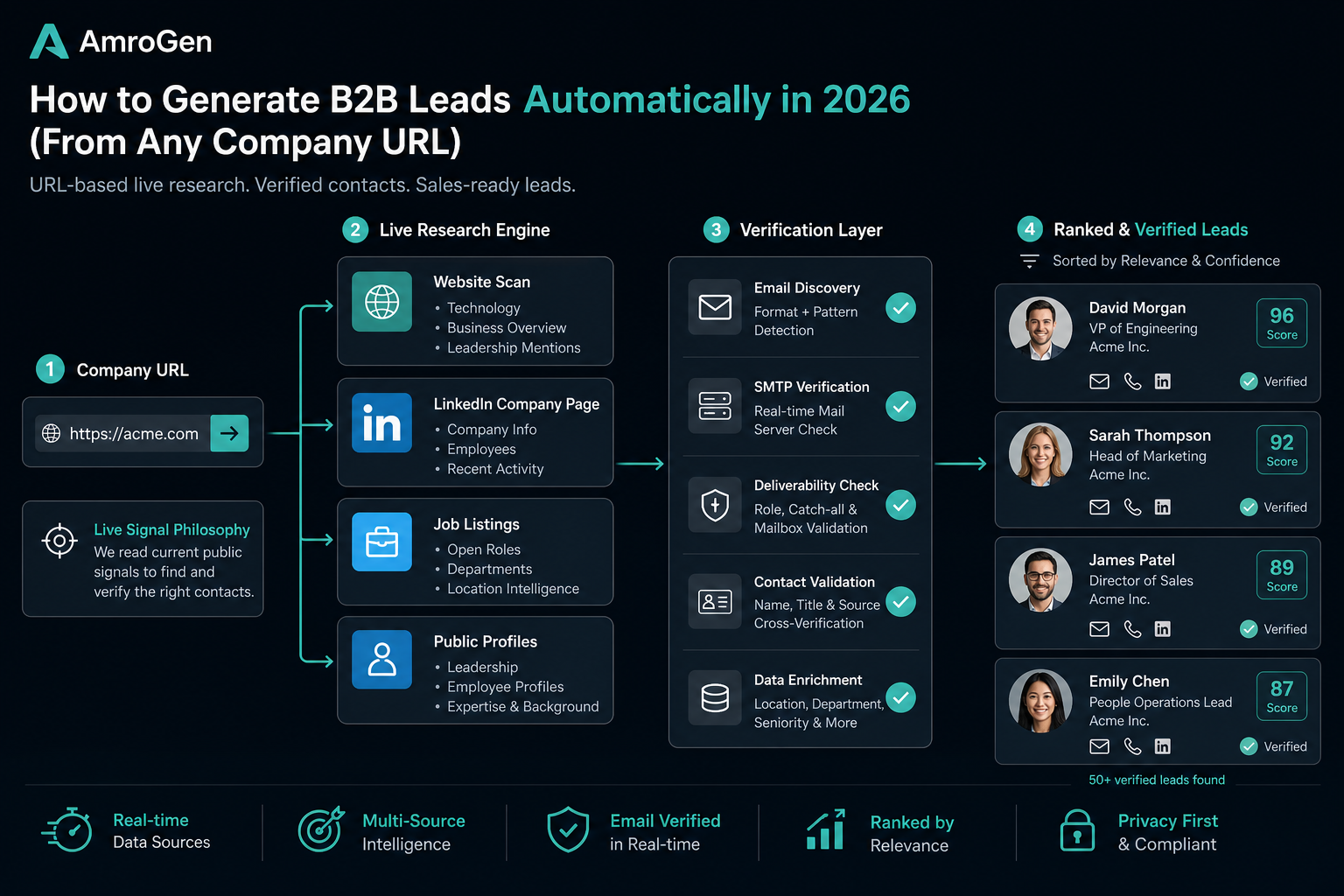
This is the method most guides on this topic skip entirely, because it doesn't fit neatly into "database" or "inbound." Instead of searching stored records or waiting for inbound traffic, an AI agent is given a single input — a target company's URL — and goes to research that company directly: its website, its LinkedIn presence, its public job listings, the actual people currently working there in relevant roles.
AmroGen's Lead Generator agent works this way. Enter a company URL, and it browses the company's live web presence to identify decision-makers, returns email addresses where available (some may be pattern-derived) (not against a stored record from months earlier), and returns a ranked list with title, company, email where available, LinkedIn URL, phone where available, and an ICP fit score — in a full agent run.
The trade-off relative to a database is volume per query: you get the right 10–100 contacts at a specific target company, not thousands across a broad segment. The advantage is freshness and coverage where databases are weakest — smaller companies, international markets, and very recent hires that a quarterly-refreshed database hasn't caught up to yet.
Good for: Teams without an existing lead list who want targeted, account-specific contacts with current data, and who want lead generation to flow directly into AI-written, quality-reviewed outreach rather than stopping at a CSV export.
Step-by-Step: Your First Automated Campaign
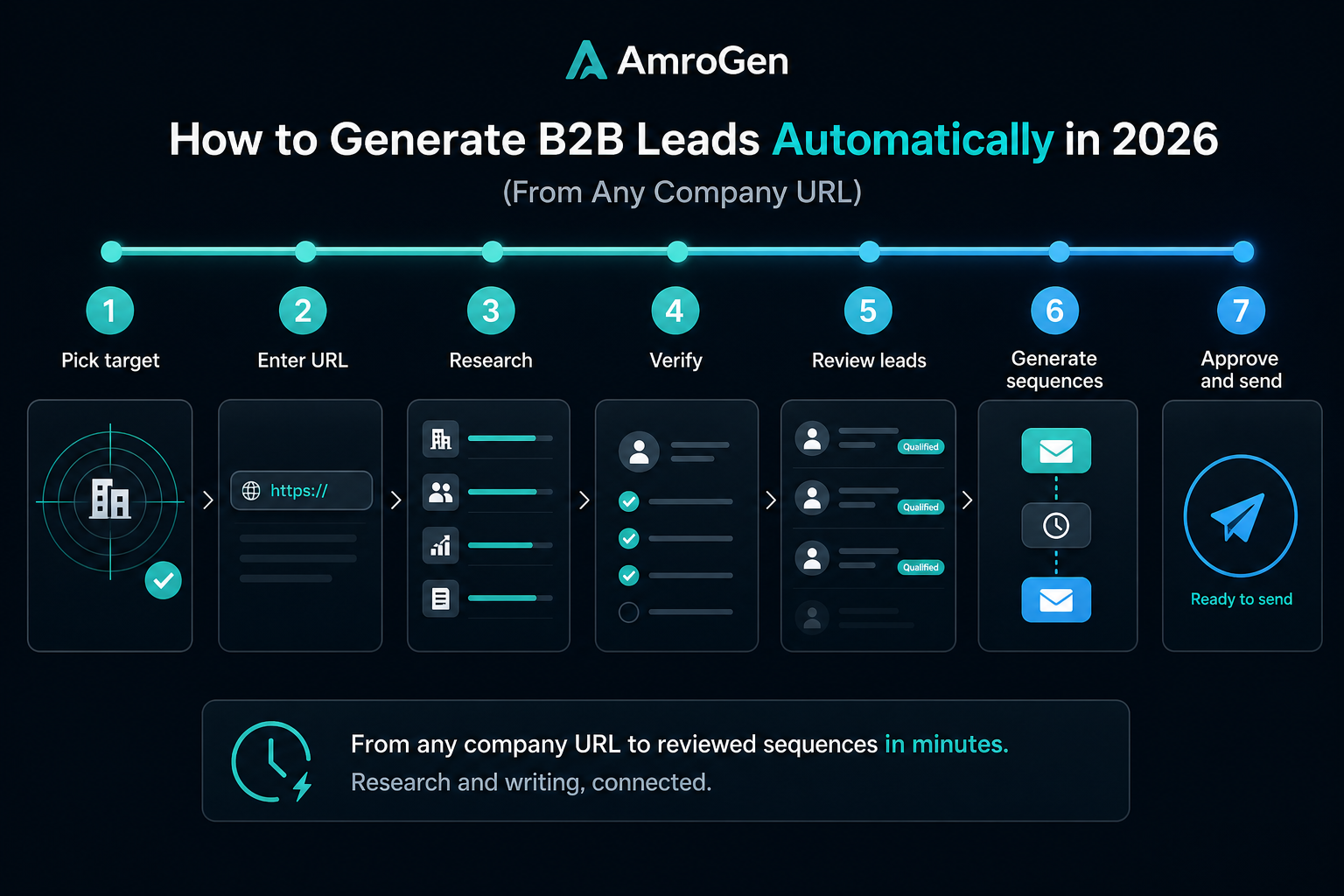
Here's the exact process to generate your first automated B2B lead list using the URL-based method.
Step 1 — Pick a target company. This can be a prospective customer, a competitor's customer, a company from a conference attendee list, or any business with a public website.
Step 2 — Enter the URL and set your parameters. Paste the company's website URL into AmroGen, set how many leads you want (10–100), and start the pipeline. No list to upload, no database filters to configure.
Step 3 — The agent researches automatically. The Lead Generator reads the company's site and public presence, identifies relevant decision-maker roles based on your target criteria, and finds currently employed people matching those roles.
Step 4 — Contacts get enriched and verified. Each lead returns with a verified email (SMTP-checked at this moment, not pulled from storage), LinkedIn URL, phone where available, and an ICP fit score.
Step 5 — Review the list. Every contact is shown to you before anything else happens. Remove anyone who isn't a fit, confirm the rest.
Step 6 — Sequences generate automatically. From here, specialist agents write personalised email, LinkedIn, and SMS sequences for each approved lead, with a built-in quality review before you see the output.
Step 7 — Approve and send. Review the generated sequences, approve individually or all at once, and email steps dispatch from your connected Gmail on their scheduled days.
Total time from URL to a reviewed, ready-to-send campaign: typically a full agent run (runtime varies) for a 25-lead run.
FAQ
How do I generate B2B leads automatically? Six common approaches: database search tools (fast, broad, but 70–85% typical accuracy means real bounce risk), chatbot capture (works only on existing traffic), content/SEO (durable but slow to build), paid acquisition (fast but ongoing cost), intent-signal monitoring (prioritises within an existing list), and URL-based live research, which finds and verifies contacts at a specific target company without needing a pre-built list or database subscription.
What is the best way to automate B2B lead generation? Depends on whether you already have a target account list. If you do and need volume across many companies, a database tool with intent signals layered on top is typically strongest. If you don't have a list and want to start from specific target companies with fresh, verified data, URL-based research is purpose-built for that.
How do I build a B2B lead list without buying contacts? URL-based research is the most direct route — instead of purchasing access to a stored database, an agent researches each target company's live web presence at the time you run the campaign, returning researched contacts without any per-contact database fee.
How many leads can I generate automatically per month? With database tools, limits are typically set by your subscription tier and credit allocation, often in the thousands per month. With URL-based research tools like AmroGen, output is capped per run (up to 100 leads) but unconstrained in terms of how many runs you can do — limited by credits rather than a monthly contact cap.
What is the best free B2B lead generation tool? Apollo and HubSpot both offer functional free tiers with limited credits — reasonable starting points for testing the category before committing budget. Most URL-based research tools, including AmroGen, run on pay-as-you-go pricing rather than a free tier, at roughly $2.80 per full campaign run.
Reflects publicly available information as of June 2026.
Internal links: /campaigns/new · /features/lead-generation · /pricing