The Only Outreach Tool That sends via Resend or Gmail when connected (Not a Cold Domain)
TL;DR
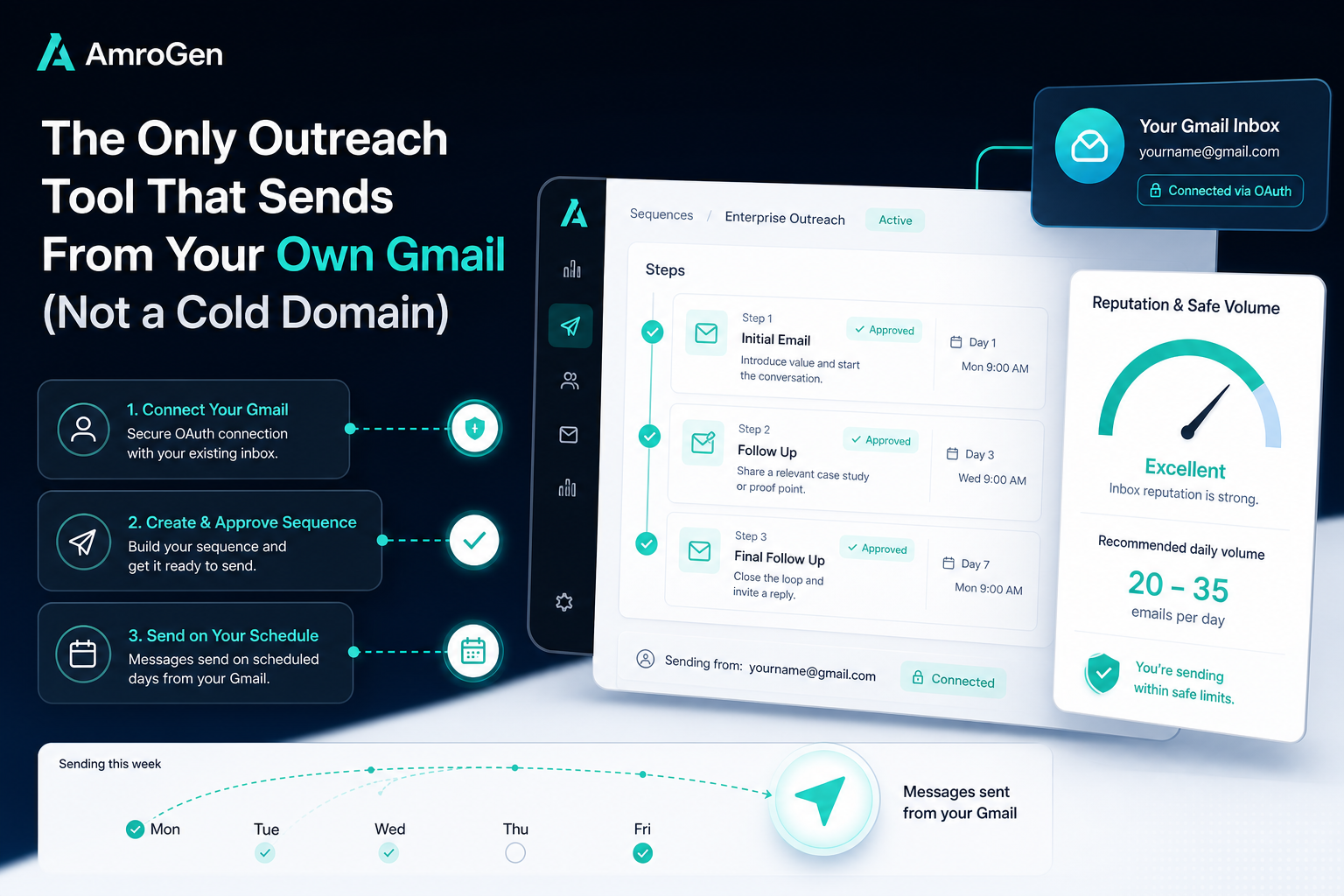
Most cold email tools route sends through a separate domain purchased specifically for outbound — which requires weeks of warm-up and carries real risk if it's mishandled. Gmail itself caps free accounts at 500 emails/day and Workspace at 2,000/day, but the safe practical limit for cold outreach sits much lower — most deliverability specialists recommend 25–100 emails per day per inbox depending on warm-up status, since Google's behavioural filters flag volume patterns well before the official cap. AmroGen sends from your own connected Gmail account rather than a cold domain, working within Gmail's actual limits by design — meaning no domain purchase, no warm-up period, and your existing sender reputation carries the campaign. This guide explains exactly how Gmail's limits work, why cold domains exist as a workaround, and what sending from your own inbox actually looks like in practice.
Table of Contents
- Can You Actually Send Cold Emails From Gmail?
- Gmail's Real Sending Limits in 2026
- Why Most Tools Use a Cold Domain Instead
- The Trade-Off: Cold Domain vs Your Own Gmail
- How AmroGen Connects to Gmail
- What an Approved Sequence Looks Like Once Connected
- Is It Legal to Send Cold Emails From Gmail?
- FAQ
Can You Actually Send Cold Emails From Gmail?
Yes, within limits — and the limits matter more than most cold email guides admit. Gmail is built for personal and transactional communication, not bulk campaigns, and Google's behavioural filters scrutinise unsolicited outreach to strangers far more aggressively than they scrutinise emails to people you already correspond with. That doesn't mean Gmail can't be used for cold outreach — it means the safe volume for cold outreach is a fraction of Gmail's official daily cap, and most tools that claim "Gmail integration" are actually working around this limitation rather than respecting it.
Gmail's Real Sending Limits in 2026
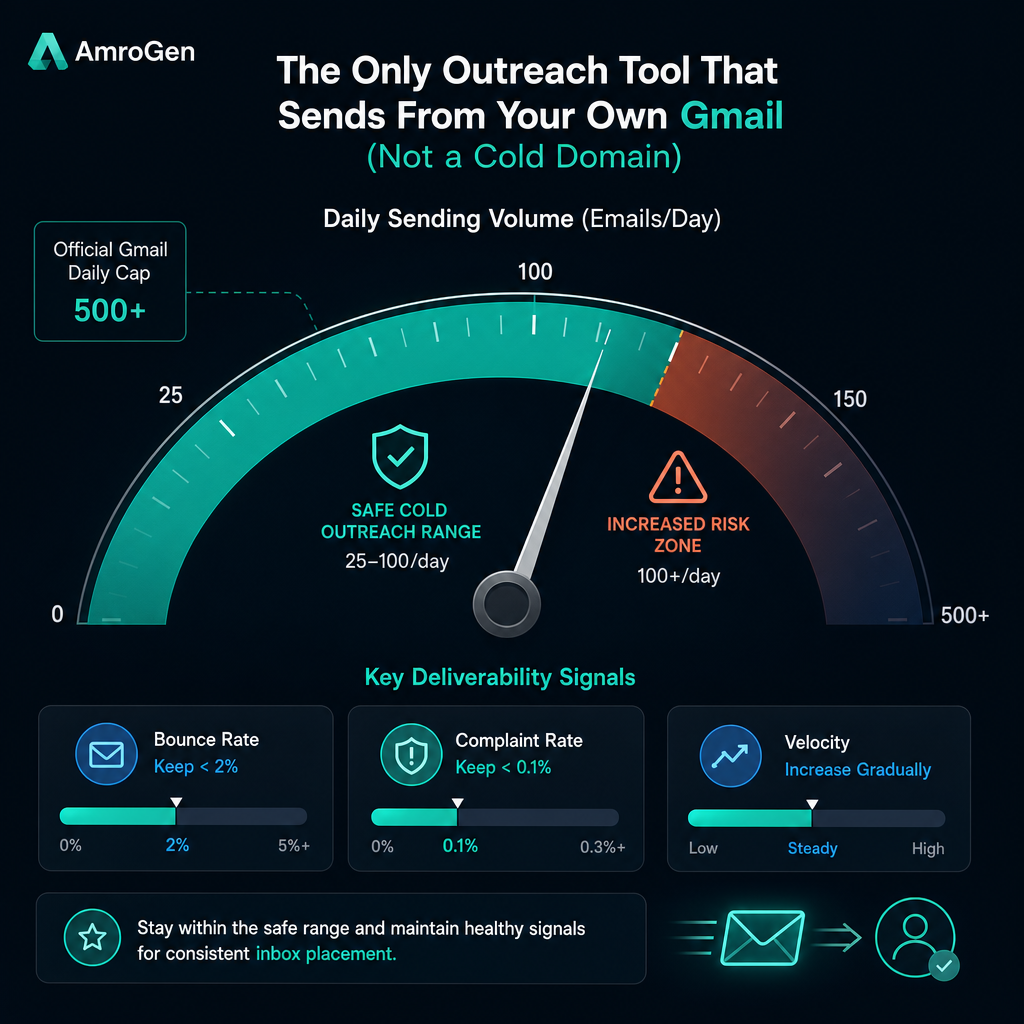
There's a meaningful gap between what Gmail technically allows and what's safe for cold outreach specifically.
Official limits: Free Gmail accounts cap at 500 emails per 24-hour rolling window. Google Workspace accounts cap at 2,000 emails per day (with a lower 1,500/day cap specifically for mail merge tools, even on paid plans). These limits reset on a rolling 24-hour basis, not at midnight.
Safe limits for cold outreach: Considerably lower than the official cap. Industry consensus across multiple deliverability specialists puts the safe daily volume at roughly 25–100 cold emails per inbox, with new or unwarmed accounts starting closer to 10–20 per day and gradually scaling up. Experienced senders on cold email forums consistently recommend staying well under the ceiling — closer to 50 per account per day — because the gap between the official cap and actual enforcement is where most accounts get flagged.
Why the gap exists: Google's spam filtering looks at behavioural signals beyond raw volume — bounce rate above roughly 10–15% on even a small batch can trigger suspension, and spam complaint rates above 0.3% put an account in serious risk territory, with Google's official guidance recommending senders stay under a 0.08% complaint rate as a safety buffer below the 0.10% hard threshold. Sending velocity matters too — 200 identical emails sent within minutes of each other reads as automated behaviour regardless of total volume, which is part of why a tool that paces sends naturally across a longer window performs better than one that blasts a batch instantly.
Why Most Tools Use a Cold Domain Instead
Given these constraints, the standard industry solution for high-volume outbound is a dedicated cold sending domain — a domain purchased specifically for outreach, kept separate from your primary business domain, with its own warm-up schedule and its own reputation to build from zero. Tools like Smartlead and Instantly build their entire value proposition around managing this infrastructure — multiple warmed inboxes, intelligent rotation across them, and reputation protection that lets a team send thousands of emails daily without any single inbox hitting Gmail's behavioural triggers.
This is a genuinely good solution for the problem it solves: high-volume outbound at scale, where the per-inbox limits described above would otherwise force you to manage dozens of separate Gmail accounts manually. The trade-off is that a brand-new cold domain has zero sender history — it's earning trust from nothing, which is precisely why warm-up exists, and why a poorly managed cold domain can torch its own reputation just as fast as a Gmail account that ignores the limits above.
The Trade-Off: Cold Domain vs Your Own Gmail
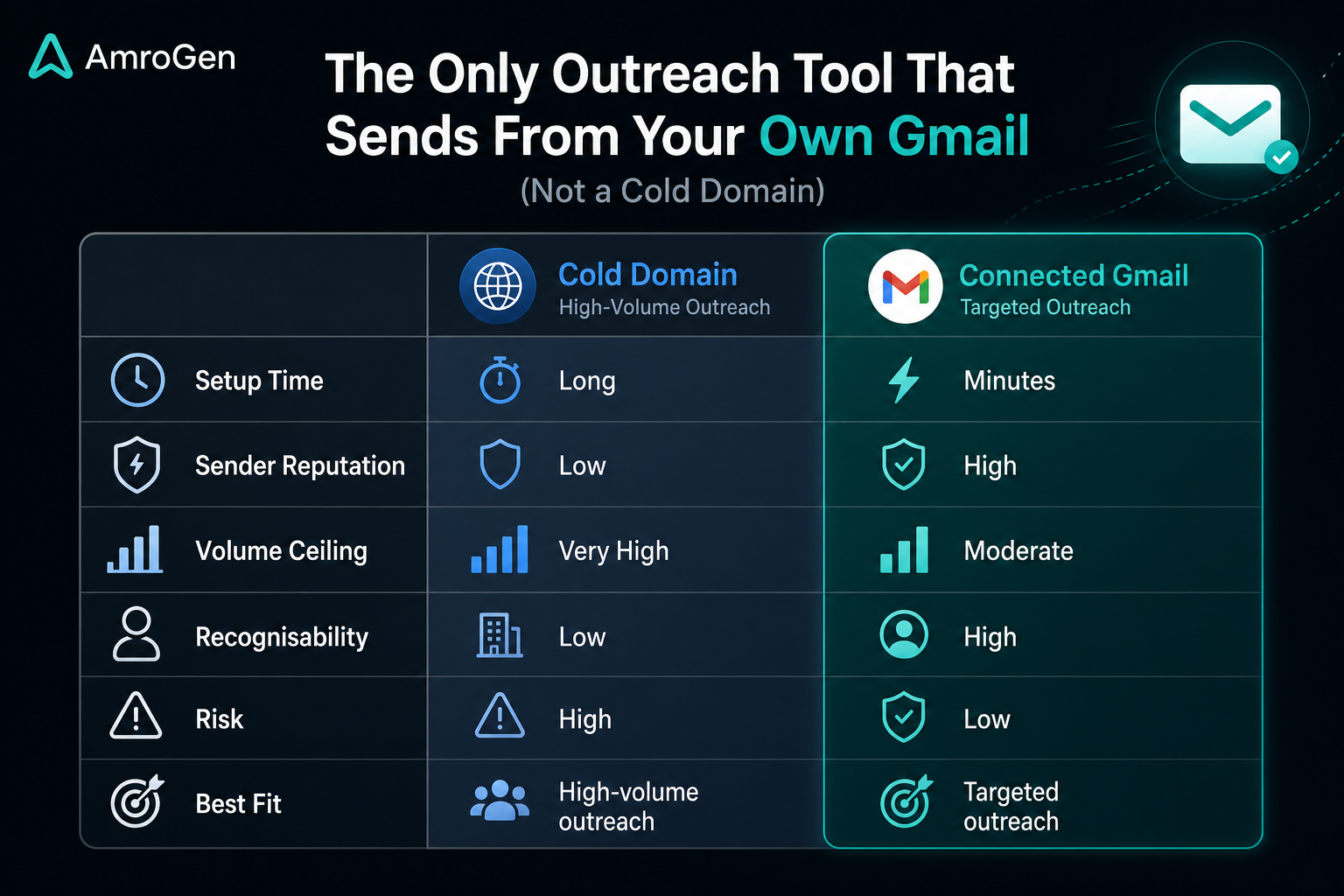
| Cold sending domain | Your own connected Gmail | |
|---|---|---|
| Setup time | Domain purchase + DNS configuration + weeks of warm-up | Immediate — OAuth connection |
| Sender reputation | Starts at zero, has to be built | Inherits your existing reputation |
| Volume ceiling | High once warmed (hundreds–thousands/day across rotated inboxes) | Lower (roughly 25–100/day per the safe-limit research above) |
| Brand recognisability | Unfamiliar domain to the recipient | Your actual email, possibly already known to the recipient |
| Risk if mismanaged | Reputation damage isolated to the cold domain | Reputation damage affects your primary inbox |
| Best fit | High-volume outbound across many hundreds of contacts/week | Targeted outbound to a smaller, qualified list |
Neither approach is universally correct. The decision genuinely depends on volume: if your outbound motion requires sending to thousands of contacts weekly, a managed cold-domain infrastructure is the right tool, and trying to force that volume through a single Gmail account will trigger exactly the suspension risk described above. If your outbound is targeted — tens to low hundreds of qualified contacts per campaign rather than thousands — sending from your own established Gmail account, within its safe limits, sidesteps the entire cold-domain warm-up problem.
How AmroGen Connects to Gmail
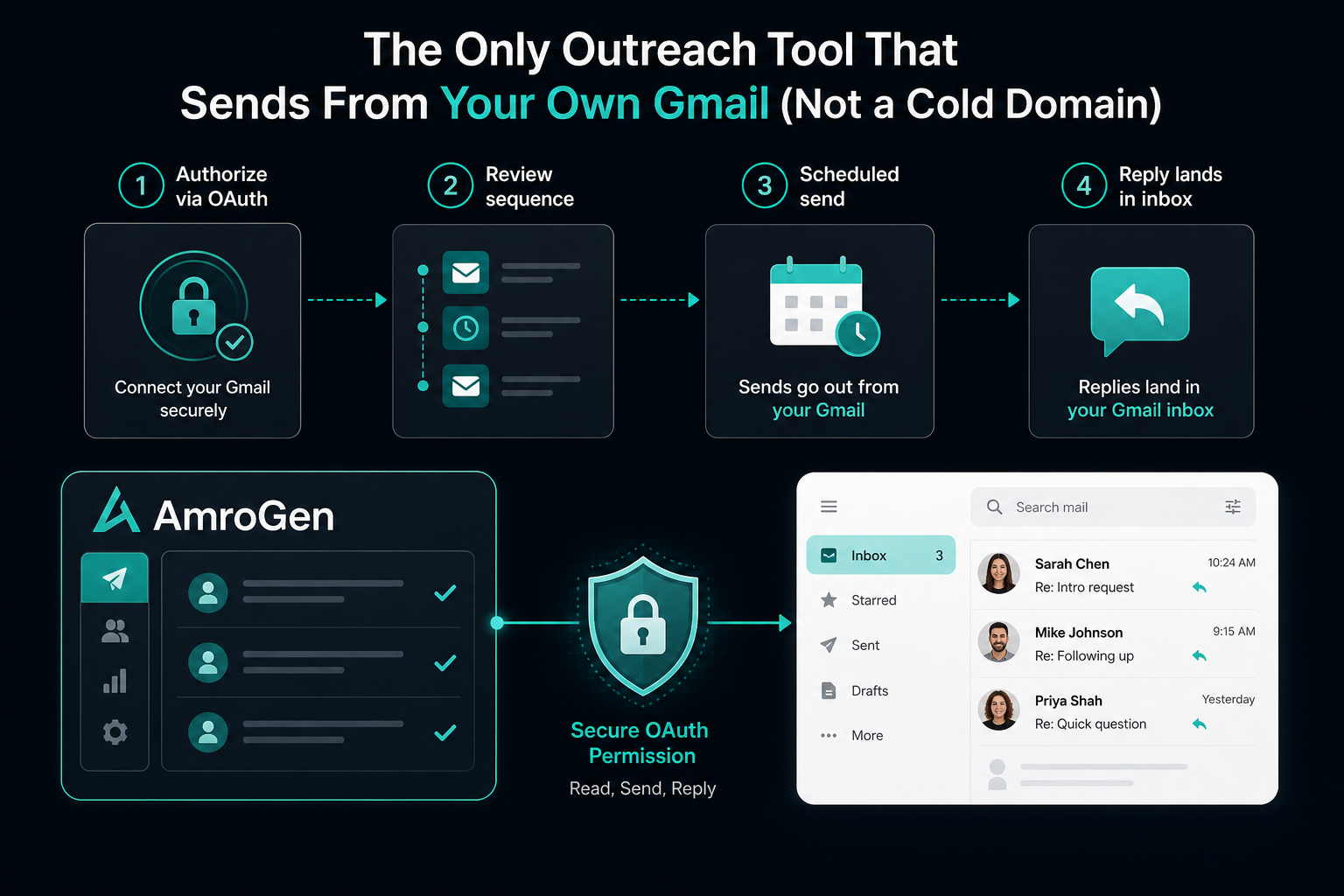
AmroGen is built for the second category — targeted, account-specific outbound rather than mass-volume blasting — which makes Resend or Gmail sending the right architectural choice rather than a limitation to work around.
Connecting Gmail uses standard OAuth: you authorise AmroGen to send on your behalf through Google's own permission flow, the same mechanism any legitimate Gmail-integrated app uses, rather than requiring your password or routing mail through a separate SMTP relay that Google's filters would flag as suspicious. Once connected, approved email sequence steps dispatch directly from your Gmail account on their scheduled day — paced naturally rather than fired in a single batch, respecting the velocity signal that Google's filters watch for.
Because AmroGen's campaigns are sized for targeted outreach (typically 10–100 leads per run, not thousands), the resulting send volume per campaign fits comfortably within Gmail's safe limits without requiring inbox rotation or multi-domain infrastructure.
What an Approved Sequence Looks Like Once Connected
Once Gmail is connected and a sequence is approved, each email step in the campaign — typically spread across days 1, 4, 8, 14, and 21 for a standard sequence — sends automatically from your inbox on its scheduled day. Replies land in your normal inbox, the same place any email reply would, rather than a separate unified inbox you have to check across multiple tools. From the recipient's side, the email arrives from an address that may already be familiar or at minimum looks like a real person's inbox rather than an obviously commercial sending domain, which is part of why Resend or Gmail sending tends to perform well on the trust signal that determines whether a first cold touch gets opened at all.
Is It Legal to Send Cold Emails From Gmail?
Yes, with standard cold email compliance requirements that apply regardless of which inbox you send from. In the US, CAN-SPAM requires a valid physical address, no deceptive subject lines or headers, and an easy opt-out mechanism. In the EU, GDPR permits B2B cold email under legitimate interest, provided there's a genuine business reason for contacting the recipient and an easy way to opt out. Canada's CASL is the strictest of the three, generally requiring express consent before sending commercial email. None of these regulations specifically restrict sending from a personal or Workspace Gmail address versus a separate domain — the compliance requirements are about consent and transparency, not which inbox technology you use.
FAQ
Can you send cold emails from Gmail? Yes, within Gmail's behavioural limits. The official cap is 500/day (free) or 2,000/day (Workspace), but the safe practical limit for cold outreach specifically is much lower — roughly 25–100 emails per day per inbox depending on warm-up status, since Google's spam filters flag volume and velocity patterns well before the official cap is reached.
What outreach tools send from Gmail? AmroGen sends sequences directly from your connected Gmail account via OAuth. Woodpecker also supports direct Gmail and Outlook connection rather than a separate cold domain. Most other major outreach platforms — Instantly, Smartlead, Lemlist — are built around dedicated cold sending domains instead.
Is it legal to send cold emails from Gmail? Yes, subject to the same compliance requirements that apply to cold email generally — CAN-SPAM in the US, GDPR in the EU, CASL in Canada. These laws govern consent and opt-out mechanisms, not which specific email infrastructure you use to send.
How do I use Gmail for cold email outreach? Connect your Gmail account via OAuth to a tool built for Resend or Gmail sending, keep volume within the safe limits (roughly 25–100/day per inbox depending on warm-up), verify your email list to avoid the bounce rates that trigger suspension, and pace sends naturally across the day rather than sending in a single rapid batch.
What is the best Gmail cold email extension? Browser extensions and add-ons vary in how they integrate, but the more reliable architecture is a platform that connects via Google's standard OAuth flow (as AmroGen and Woodpecker do) rather than tools that route mail through external SMTP relays disguised as Gmail sends, which Google's filters are specifically designed to detect.
Data on Gmail sending limits and Google's sender guidelines reflects publicly documented information as of June 2026. Always confirm current limits directly via Google's official documentation, as enforcement details continue to evolve.
Internal links: /features/ai-sequences · /pricing